
Redmine Smart Companion: Redesigning Time Entry as a Desktop Workflow
Redmine Smart Companion is a desktop time-management tool built with an Electron/React/TypeScript frontend and a local Python FastAPI backend. I reorganized planning, tracking, and time-entry steps that were previously scattered across browser pages into a “Plan → Track → Review → Log” workflow and packaged it as a Windows application.
Context: Time Entry Interrupts Engineering Work
Redmine can manage issues and time entries, but in the workflow I observed, creating one record could involve roughly ten clicks and page transitions. The earlier estimate of “about 30 minutes per day” was an experience from that usage context, not a formal benchmark across Redmine versions or teams.
The deeper problem was not only click count. Planning happened elsewhere, while Redmine required the engineer to select a project, issue, date, hours, and comment, followed by another check for missing weekly entries. Each transition interrupted the development context.
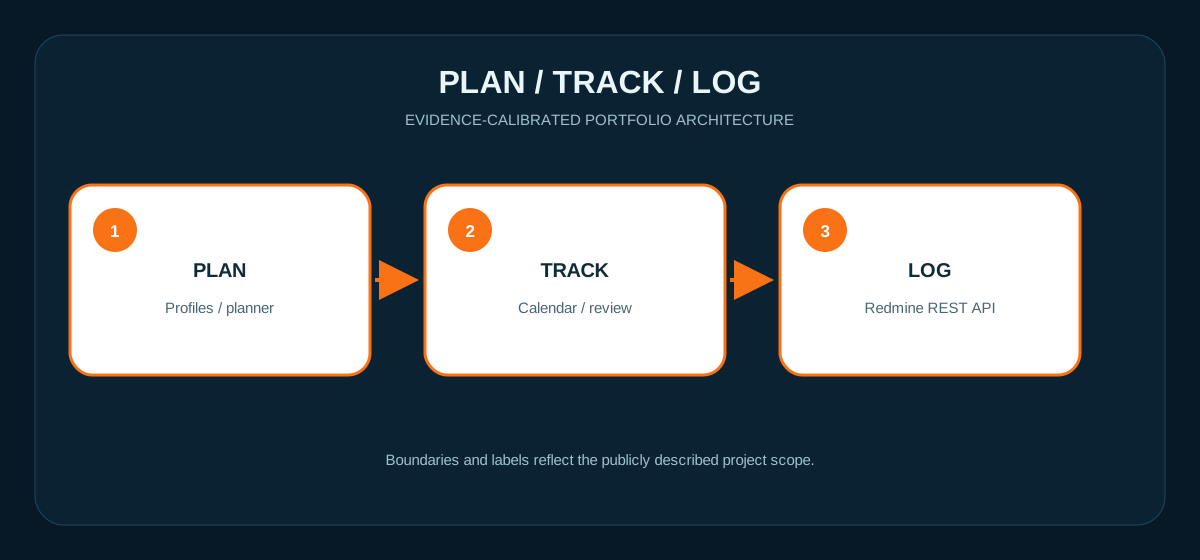
Experience Design: Plan → Track → Review → Log
- Plan: Use a daily planner and reusable profiles to create work items with less repetitive input.
- Track: Arrange work blocks in a weekly calendar with drag-and-drop scheduling while preserving lunch or unallocated gaps.
- Review: Use a weekly overview to check daily and weekly distribution and return to the issue context before submission.
- Log: Send locally prepared data to the Redmine API to create the time entry.
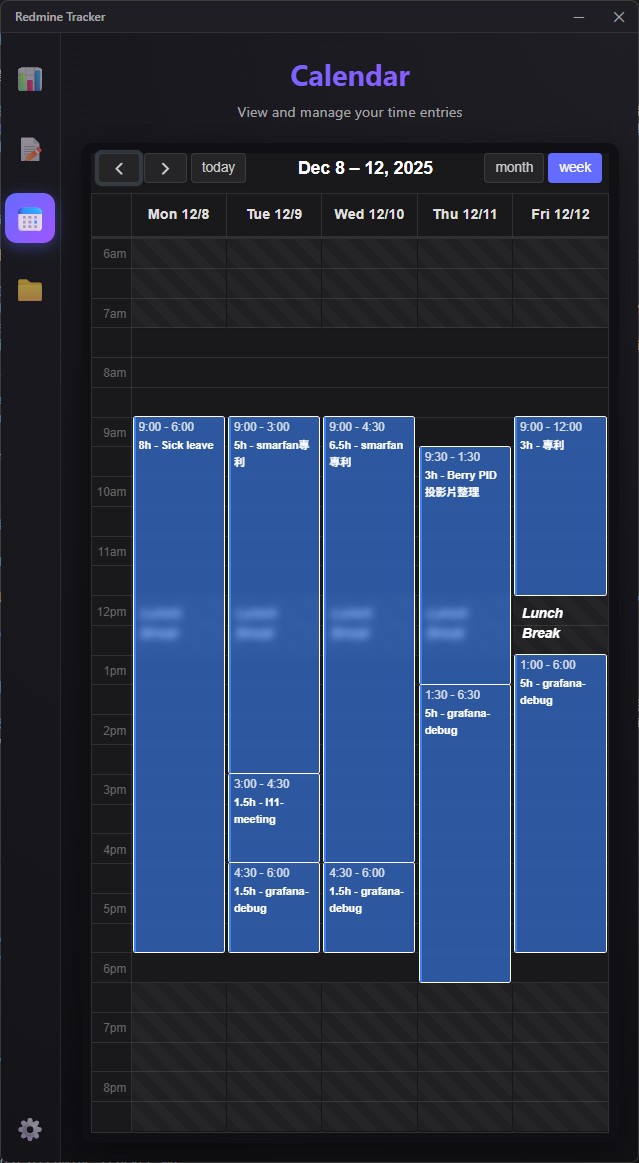 Actual interface: weekly work blocks and gaps are visible. The screenshot demonstrates the UI surface, but does not by itself prove a remote write result.
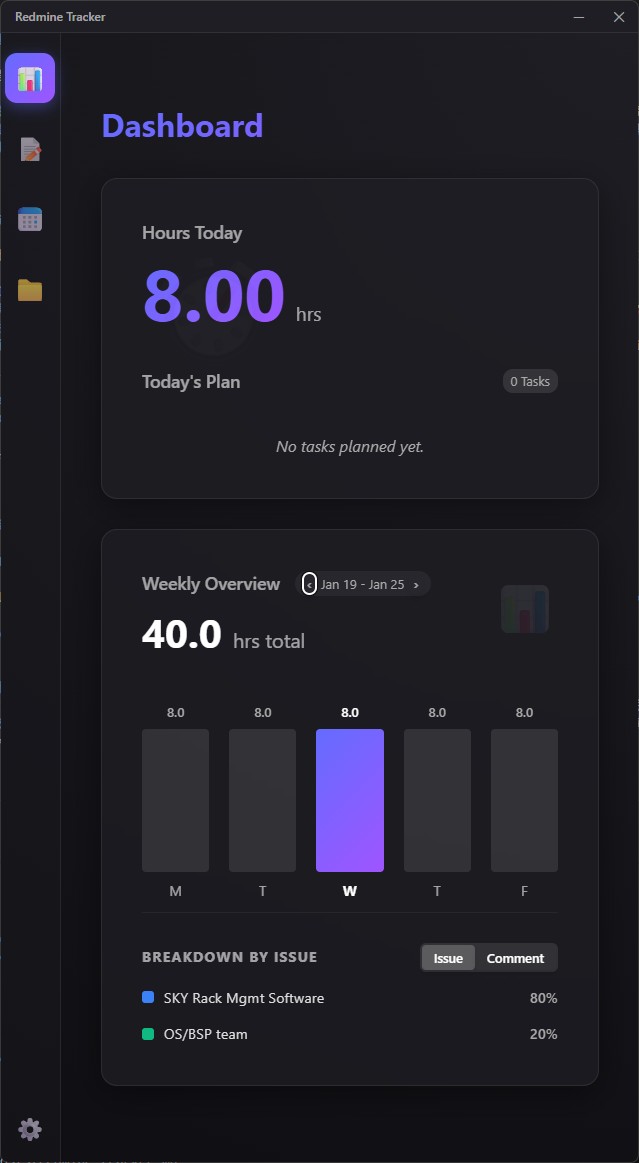 Actual interface: daily and weekly summaries plus issue distribution support human review around the time-entry workflow.
Hybrid Desktop Architecture
The system separates the desktop experience from existing Python automation assets:
| Layer | Technology | Responsibility |
|---|---|---|
| Renderer | Vite, React, TypeScript | Calendar, dashboard, profiles, and user interaction |
| Desktop shell | Electron main process | Window, application lifecycle, and Python subprocess management |
| Local service | FastAPI, Python | Redmine API wrapper, data logic, and existing script integration |
| Remote system | Redmine REST API | System of record for issue context and time data |
The main reason for choosing a Python backend was to reuse existing automation code without moving Redmine data logic into the UI. It also leaves room for future Pandas/Scikit-learn analysis of historical time entries. History-based time prediction remains a roadmap item, not a currently validated AI feature.
Windows Packaging and Process Lifecycle
I used PyInstaller to bundle FastAPI and its Python dependencies into backend.exe. The Electron main process starts and stops the local service, and electron-builder produces the Windows installer. This removes the need for users to install Python separately, while introducing lifecycle concerns such as backend startup failures, graceful shutdown, and port 8000 conflicts such as Errno 10048.
The original article described the desktop design as cross-platform, but the public evidence covers only a Windows executable and installer. I therefore claim Windows desktop packaging, not completed macOS or Linux distribution.
Remote-Write and Security Boundary
A time entry changes official Redmine data, so “seamless automation” is not a sufficient control model. The public material does not establish API-key storage, authentication between the renderer and localhost backend, TLS assumptions, log redaction, submission preview, retry deduplication, or error recovery. A production deployment should at minimum:
- Display the project, issue, date, hours, and comment clearly before user confirmation.
- Prevent retries from creating duplicate entries and preserve the Redmine response/error state.
- Restrict the local bind address, protect credentials, and keep tokens out of logs.
- Separate “local draft” from “successfully written to Redmine” states.
These are necessary engineering boundaries for remote writes. Without source code and test evidence, I do not claim that the public version has completed every control above.
Verifiable Outcome and Limits
The public artifacts support the planner/calendar/dashboard interface, the React + Electron + FastAPI hybrid design, and the Windows backend/installer packaging path. They do not include build logs, release artifacts, API integration tests, before/after operation timing, or user research, so I do not claim a fixed productivity gain.
For a measurable next iteration, I would track median interactions and elapsed time per entry, duplicate/failure rate, sync success rate, startup time, and the number of manual corrections.
Technology
Electron · Vite · React · TypeScript · Python · FastAPI · PyInstaller · electron-builder · Redmine REST API