
Redmine Smart Companion: Reshaping Time Management with Desktop Automation Tool
This project developed a cross-platform desktop application designed to solve the “cumbersome operation” and “workflow interruption” problems engineers face when logging time in the Redmine system.
📋 Abstract
This is a desktop productivity tool combining modern UI with a powerful Python backend.
By combining Electron (React) modern frontend with Python FastAPI powerful backend, I built a “Hybrid Architecture” solution.
This tool simplifies tasks that originally required 10 webpage operations into “one-click completion” and introduces visualization dashboards and smart scheduling features. This not only eliminates the administrative burden of time logging but also reserves architectural flexibility for future AI time prediction features, successfully transforming passive administrative work into an efficient productivity management experience.
🛑 The Problem
In software development workflows, Redmine is a powerful project management tool, but its “Time Logging” experience is quite outdated and user-unfriendly:
- ⏳ High Time Cost: Recording one time entry requires approximately 10 clicks and page navigations. Engineers spend about 30 minutes daily handling such administrative tasks.
- 💔 Context Switch: To log time, developers must interrupt their flow state and switch browser tabs, causing decreased work efficiency.
- 📉 Lack of Feedback: The native interface lacks real-time data visualization, making it difficult for users to track weekly time status, easily causing missed entries or overtime.
💡 Solution & UX Design
To thoroughly address these pain points, I designed a closed-loop “Plan ➝ Track ➝ Log” workflow, adopting a Glassmorphism style dark mode UI to create an immersive desktop experience.
1. The “Focus First” Workflow
- Plan: Through Smart Daily Planner and Intelligent Profiles features, users can pre-load commonly used task templates (like Daily Standup) and create daily todos with one click.
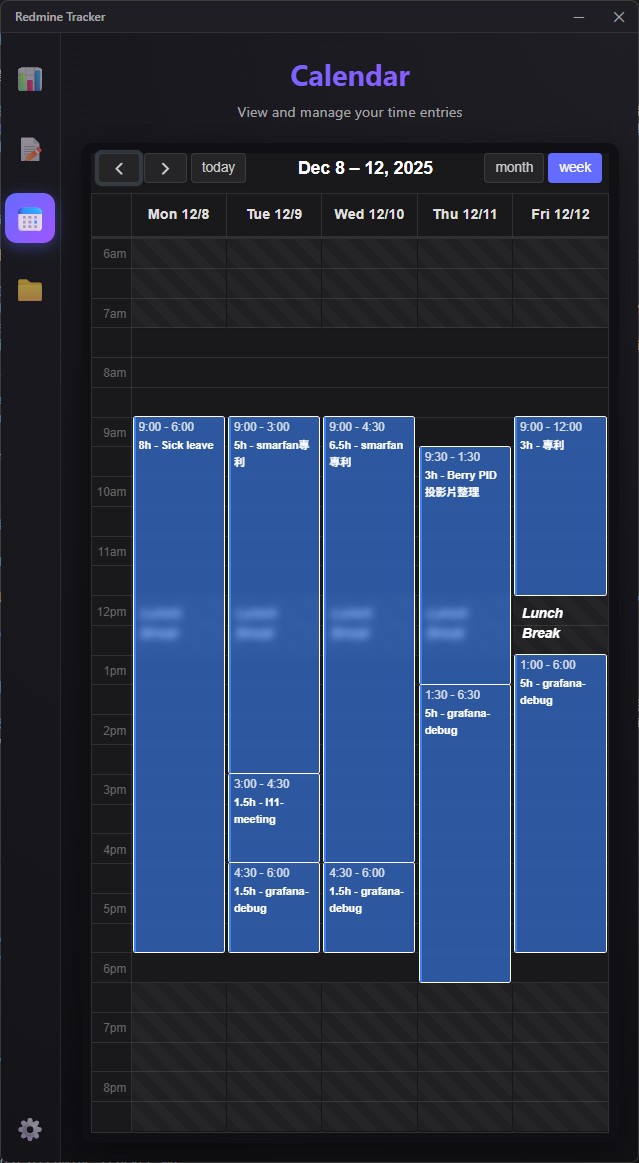
- Track: Supports drag-and-drop calendar interface. System monitors time in real-time and visually marks gaps (like lunch break) through charts.
- Log: Provides Automated Workflows. When tasks complete or end-of-day arrives, the system automatically pushes local data to Redmine API, achieving “seamless logging.”
2. Interactive Dashboard
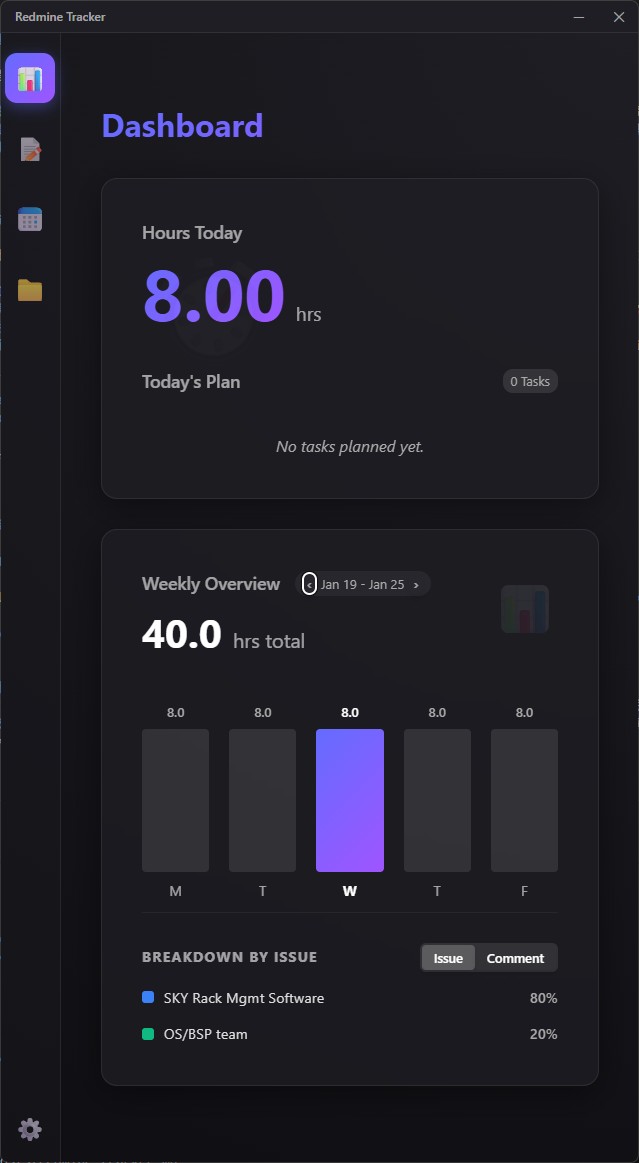
- Provides Weekly Overview bar chart, letting users grasp weekly time distribution at a glance.
- Integrates Project Deep Dive view, allowing users to check Issue status, priority, and discussion threads without opening a browser.
🛠️ Technical Case Study
1. Innovative Hybrid Architecture
Unlike traditional Electron Apps that only rely on Node.js, this project adopted a React (Frontend) + Python FastAPI (Backend) concurrent architecture.
- Frontend: Built with Vite + React + TypeScript, ensuring ultimate rendering performance and type safety.
- Backend: Uses Python FastAPI as local server, handling Redmine API interactions and data logic.
🤔 Why This Architecture? (Why Python Backend?)
- Legacy Integration: Can directly encapsulate and reuse my previously written efficient Python automation scripts, significantly shortening development cycles.
- AI Readiness: Preparing for future Roadmap. Python has the richest AI/ML ecosystem. This architecture layer allows me to easily integrate
Scikit-learnorPandasin the future to implement “history-based smart time prediction” features without restructuring the entire backend.
2. Packaging & Distribution
Packaging Python environment into Electron is a major technical challenge. I built an automated Build Pipeline:
- Backend Compilation: Uses PyInstaller to compile Python FastAPI environment and dependencies into a single executable (
backend.exe), solving the problem of users not needing to install Python environment. - Cross-Process Communication: Electron Main Process manages the Python subprocess lifecycle (startup and graceful shutdown) and handles Port 8000 occupation conflicts (Errno 10048).
- Installer Creation: Finally uses electron-builder to package React frontend and Python executable into standard Windows installer (
.exe).